Understanding smartphone memory, performance, storage capacity, and how to avoid spending more than necessary on your next iPhone or Android device.
When shopping for a new smartphone in the United States, you may see specifications such as 8GB RAM, 12GB RAM, 128GB storage, or 512GB storage. These numbers look similar, but they describe two fundamentally different parts of your phone.
Understanding the difference between RAM and phone storage can help you avoid buying an expensive smartphone with features you may never need. It can also explain why your phone becomes slow, why applications sometimes restart, and why you suddenly receive a warning that your storage is almost full.
Imagine purchasing a smartphone with 256GB of storage, believing that it will automatically perform much faster than a phone with 128GB. Several months later, you discover that the more expensive device still struggles with multitasking.
The problem may not be the amount of storage. Your phone could have insufficient RAM, an aging battery, demanding software, or another performance limitation.
For American consumers, this distinction matters financially. Smartphone upgrades can cost hundreds of dollars, and choosing the wrong configuration can mean paying more without receiving a meaningful improvement in everyday use.
This guide explains how RAM and storage work, what they affect, how much you may need in 2026, and how to choose a phone that fits your lifestyle and budget.
1. What Is the Difference Between RAM and Phone Storage?
The main difference is simple: RAM helps your smartphone run active applications, while phone storage saves your applications, photographs, videos, and other files.
Both are measured in gigabytes (GB), but they serve very different purposes.
Google’s Android documentation distinguishes memory, which runs programs, from storage, which retains data such as photos and music.
1.1 What is RAM in a smartphone?
RAM stands for Random Access Memory.
It serves as the phone’s temporary working area. When you open your camera, use a navigation app, browse the internet, or switch between messages, your smartphone uses RAM to manage active information.
RAM is volatile memory, meaning its contents do not persist in the same way as saved files after the phone is turned off.
Think of RAM as the working surface of a desk.
A larger desk gives you more room to keep documents and materials available without constantly putting things away.
Similarly, more RAM can help a smartphone keep additional applications and working data readily accessible.
However, more RAM does not automatically make the processor faster.
1.2 What is phone storage?
Phone storage is the space that permanently holds digital information until it is deleted or overwritten.
It includes downloaded applications, photos, videos, music, documents, and operating-system files.
Modern smartphones generally use NAND flash-based storage, often implemented through standards such as Universal Flash Storage (UFS) or Apple’s integrated storage architecture.
Unlike RAM, storage is nonvolatile. Your photos remain saved when the phone is switched off.
Using the desk analogy, storage is the filing cabinet where you keep documents for future use.
A larger filing cabinet holds more files, but it does not necessarily make you work faster.
1.3 RAM vs. phone storage comparison
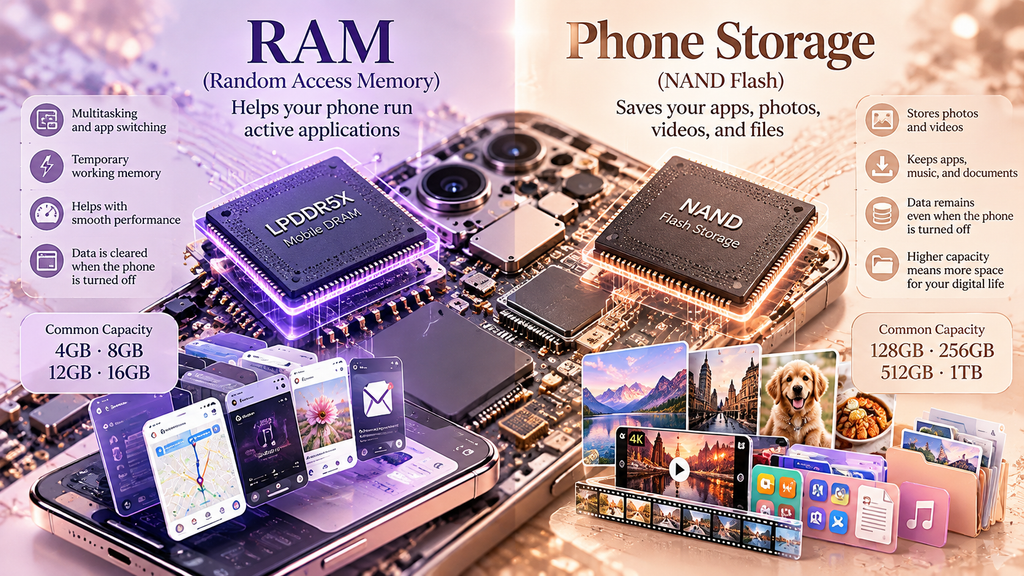
| Feature | RAM | Phone storage |
|---|---|---|
| Main purpose | Manages active tasks | Saves apps and files |
| Data after shutdown | Temporary data is lost | Saved data remains |
| Common example capacities | 4GB, 8GB, 12GB, 16GB | 128GB, 256GB, 512GB, 1TB |
| Helps with | Multitasking, active processing | Photos, downloads, recordings |
| Can become full? | Yes, operating system manages it | Yes, user may need to free space |
| Can users usually upgrade it? | No | Usually not internally |
| Typical technology | LPDDR memory | NAND flash storage |
Note: Capacities are illustrative examples, not requirements or specifications for every smartphone sold in 2026.
2. How Does RAM Affect Smartphone Performance?
RAM influences how comfortably your phone handles active tasks.
Many people assume that the fastest smartphone is simply the one with the highest RAM number. In practice, memory capacity is only one part of overall performance.
2.1 Multitasking and switching between apps
Suppose you are following Google Maps directions while listening to a podcast, checking messages, and occasionally opening your banking application.
Your phone must manage information associated with several applications.
With sufficient RAM, the operating system may keep recently used apps ready for faster switching.
When RAM becomes constrained, the system may reclaim memory by closing background processes.
Google explains that Android can keep inactive apps cached and terminate cached processes when additional memory is required.
As a result, you may notice that an application reloads when you return to it.
2.2 Does more RAM make a phone faster?
Sometimes, but not always.
More RAM is particularly useful when a phone regularly runs out of memory for its intended workload.
However, a phone with 12GB RAM does not automatically outperform one with 8GB.
Actual performance also depends on the processor, memory bandwidth, operating-system efficiency, software optimization, and thermal management.
For everyday tasks such as messaging, email, online shopping, and browsing, a well-optimized smartphone with moderate RAM can perform very well.
2.3 Is unused RAM wasted?
Smartphone operating systems often use available RAM to cache information and make recently used applications easier to reopen.
Seeing a high percentage of RAM usage is therefore not necessarily a problem.
Google’s Android documentation explains that the system actively uses available memory to improve responsiveness.
Constantly closing applications to make the memory display look empty may provide little benefit and can sometimes increase the work required to reopen those applications.
3. How Does Phone Storage Affect Everyday Use?
Storage determines how much digital information your device can hold.
For many smartphone owners, storage capacity becomes more noticeable over time than RAM capacity.
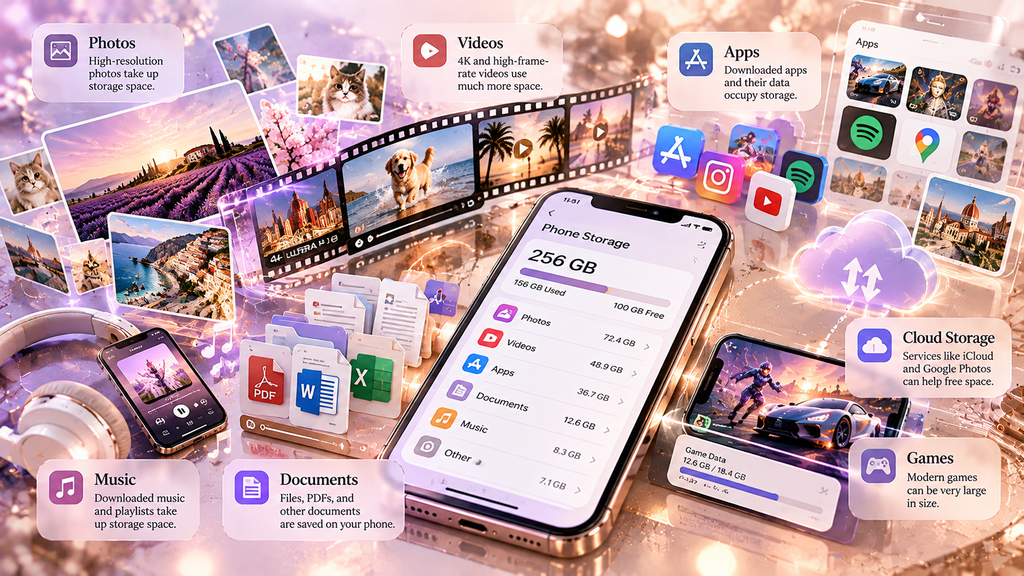
3.1 Photographs and videos
Modern smartphone cameras create increasingly large photo and video files.
A person who occasionally takes pictures may need substantially less storage than someone who regularly records long videos.
For example, consider a person who records approximately 20GB of video each month.
Over one year, those videos alone could occupy about 240GB before accounting for applications, photographs, system files, and other information.
This is a hypothetical usage example rather than a typical recording estimate.
For someone creating YouTube videos or documenting travel, storage capacity is especially important.
3.2 Applications and offline downloads
Storage is also consumed by applications and their associated data.
Navigation apps may download maps. Streaming services may store movies and music for offline use. Messaging applications may accumulate images, videos, and attachments.
Games can also occupy substantial amounts of storage.
A smartphone advertised as having 128GB will not provide all 128GB for personal files because the operating system and other necessary components use some capacity.
3.3 Can full storage slow down your phone?
Yes.
When device storage becomes extremely limited, the operating system may have difficulty allocating room for temporary files, downloads, updates, and other operations.
Apple specifically advises maintaining at least 1GB of available storage to help avoid certain slowdowns on iPhone and iPad.
For practical everyday use, keeping additional free space provides more flexibility for software updates, photographs, and unexpected downloads.
4. How Much RAM Do You Need in a Smartphone in 2026?
The ideal amount depends on the applications you use and how long you expect to keep the device.
There is no universally correct RAM capacity for everyone.
4.1 Basic users: 4GB to 6GB RAM
A smartphone with 4GB to 6GB RAM may be adequate for lighter tasks such as telephone calls, messaging, browsing, and simple applications.
However, its performance can vary significantly depending on the operating system and processor.
For someone planning to keep an Android phone for several years, limited RAM may become a constraint as applications become more demanding.
4.2 Everyday users: 8GB RAM
For many modern Android smartphones, 8GB RAM is a reasonable starting point for everyday use.
It can provide comfortable multitasking for social media, banking, messaging, navigation, and media applications when paired with capable hardware and well-optimized software.
The amount of RAM alone should not determine a purchase.
Apple’s iPhones and Android phones also manage memory differently, making direct numerical comparisons less informative.
4.3 Heavy users: 12GB to 16GB RAM
People who regularly use demanding games, video-editing applications, or advanced multitasking features may benefit from higher-capacity RAM.
Some newer AI features also increase memory demands.
However, buying 16GB RAM for occasional phone calls and simple web browsing may not provide meaningful benefits.
In August 2026, Google’s Android development team discussed broader per-app memory limits and stated that manufacturers were offering a wide range of memory configurations, from 4GB to 16GB and above.
The best choice remains workload-dependent.
5. How Much Phone Storage Do You Actually Need?
Storage requirements vary considerably depending on personal habits.
Someone who streams music and regularly backs up photos may need less local storage than someone who records high-resolution video or travels without reliable internet access.
5.1 Choosing 128GB storage
A 128GB phone may suit users who mainly make calls, browse websites, use a modest number of apps, and rely on cloud services for most media.
However, 128GB can feel restrictive when you regularly record videos or download large games.
5.2 Choosing 256GB storage
For many buyers, 256GB offers a practical balance between capacity and long-term convenience.
It provides more room for photographs, downloaded media, applications, and system updates.
This can be particularly useful when planning to keep a smartphone for several years.
5.3 Choosing 512GB or more
Higher capacities may be valuable for people who create substantial amounts of video, download large media libraries, or prefer to store files locally.
If you are producing YouTube videos, creating digital artwork, or recording interviews, additional storage can reduce the need for frequent file transfers.
However, if you already maintain a reliable backup and rarely fill your phone, the additional cost may not be justified.
5.4 RAM and storage recommendations by user type
| User type | Illustrative RAM target | Illustrative storage target |
|---|---|---|
| Basic calling and messaging | 4–6GB Android | 128GB |
| General everyday use | 8GB Android | 128–256GB |
| Heavy multitasking | 12GB Android | 256GB |
| Gaming and demanding apps | 12–16GB Android | 256–512GB |
| Frequent video creation | 8–16GB depending on device | 512GB or more |
| Long-term phone ownership | Allow headroom for future apps | 256GB or more if affordable |
These are editorial purchasing guidelines, not industry standards. iPhone RAM should be assessed through device performance and supported features rather than applying Android capacity targets directly.
6. Is Cloud Storage the Same as Phone Storage?
No. Cloud storage and internal phone storage are different services.
Cloud storage saves data on remote servers accessible through an internet connection. Internal phone storage physically resides inside the device.
Popular examples include iCloud, Google Drive, and Google Photos.
6.1 How iCloud works on an iPhone
Apple explains that device storage is built into the iPhone, while iCloud storage helps users store and synchronize photos, files, backups, and other information across devices.
For example, a person with a 128GB iPhone and a separate cloud-storage plan still owns a phone with 128GB of internal capacity.
Buying more iCloud storage does not add physical storage chips to the iPhone.
However, features such as optimized photo storage may reduce the amount of local space consumed by certain files.
6.2 How Google Photos can help Android users
Google Photos can back up photographs and videos online.
After verifying that media has been successfully backed up, users may be able to remove local copies from their devices to free space.
Google provides storage-management instructions for Android users, including deleting downloads, archiving unused apps, and managing backed-up media.
An important distinction is that deleting a synchronized photo from within a cloud photo application may also delete its cloud copy, depending on the action and settings selected.
Always verify your backup and use the application’s specific free-up-space function before deleting important photographs.
6.3 Is cloud storage cheaper than buying a larger phone?
That depends on the upgrade price and how long you use the service.
Consider a hypothetical example:
A smartphone storage upgrade costs an additional $100, while a cloud plan costs $3 per month.
Over three years, that cloud plan would cost $108, excluding taxes and price changes.
Cloud storage may still be beneficial because it supports backup and synchronization, but it does not eliminate the need for adequate internal storage.
For people who frequently travel or record videos without internet access, local storage may be more convenient.
7. Why Does a Phone Become Slow Even When It Has Plenty of Storage?
A phone with 256GB of storage can still operate slowly even when half that capacity remains unused.
Storage capacity and processing performance are not the same thing.
7.1 Insufficient available RAM
A demanding application may consume substantial RAM.
If the operating system repeatedly closes background tasks to reclaim memory, switching between apps may become less convenient.
7.2 Aging batteries and thermal limits
Smartphones manage processor performance to control heat and power demands.
A device that becomes unusually hot may reduce processing speed to maintain safe operating temperatures.
Battery condition can also affect performance on certain devices.
These problems cannot necessarily be solved by buying additional cloud storage or deleting a handful of photographs.
7.3 Software and application problems
An outdated application, software bug, background process, or operating-system issue can cause delays.
A good troubleshooting sequence is to update software, restart the phone, inspect storage availability, check battery health where available, and identify whether a particular application is causing the problem.
Avoid immediately assuming that insufficient RAM is responsible.
8. What Is Virtual RAM, and Does It Replace Physical RAM?
Some Android manufacturers advertise features called RAM Plus, memory extension, or virtual RAM.
These technologies use storage-based techniques to supplement memory management.
8.1 How memory extension works
Depending on the phone, memory-extension features may reserve a portion of internal storage or use compression and other operating-system mechanisms.
Android also uses a technology called zRAM, which compresses memory pages in RAM
These approaches are not identical and should not be confused with physically installed RAM chips.
8.2 Does virtual RAM deliver the same performance?
Not generally.
Physical RAM is designed for high-speed working memory. Flash storage has different performance characteristics.
Therefore, a phone advertising 8GB physical RAM plus 8GB extended memory should not automatically be considered equivalent to one containing 16GB physical RAM.
Memory extension may help with certain multitasking situations, but it does not guarantee better gaming, camera, or AI performance.
The advertised physical RAM capacity is the more meaningful specification to compare first.
9. How Are RAM and Storage Changing With AI Smartphones?
Artificial intelligence is increasing the importance of memory efficiency.
Some smartphones can perform voice transcription, image processing, translation, and other AI tasks locally.
Other features depend partly or entirely on cloud servers.
9.1 Why on-device AI may need more RAM
When AI processing occurs locally, the phone may need to keep model data and intermediate calculations accessible.
More RAM or higher memory bandwidth can help support certain demanding workloads.
However, AI performance also depends on the neural-processing hardware, processor, software optimization, and the particular model being used.
9.2 Why AI features also need storage

Locally installed AI models, language resources, downloaded files, and application data can occupy internal storage.
A smartphone with sufficient RAM but very limited free storage may struggle to accommodate additional models or updates.
This is why modern mobile-device design must balance both working memory and permanent storage capacity.
9.3 What South Korea contributes to smartphone memory
Major manufacturers such as Samsung Electronics and SK hynix develop mobile DRAM and NAND flash technologies used throughout the international electronics industry.
Their innovations contribute to energy efficiency, capacity, and performance.
However, an American-brand phone is not guaranteed to use Korean-manufactured memory, and a Samsung Galaxy phone is not guaranteed to use Samsung memory in every configuration.
Memory sourcing varies across manufacturers and production periods.
For American readers, the important takeaway is that smartphone technology depends on a global supply chain.
10. How Can You Check RAM and Storage on Your Phone?
Before purchasing a replacement smartphone, check your current device.
Understanding what you have can prevent unnecessary spending.
10.1 How to check iPhone storage
Open Settings → General → iPhone Storage.
Apple provides a breakdown of device storage consumption by applications and file categories.
It may also display recommendations for managing available space
iPhones generally do not provide a simple RAM-capacity display in their ordinary Settings interface.
The exact RAM specification may be found in independently documented hardware details for the particular model.
10.2 How to check Android storage and RAM
On many Android devices, open Settings → Storage to view installed storage capacity and available space.
RAM information may appear under About Phone, Device Care, Memory, or another manufacturer-specific settings area.
Menu names vary by brand and Android version.
For Samsung Galaxy devices, some models provide memory information through Device Care.
For Google Pixel devices, storage can be checked through Settings, while physical RAM specifications may be listed in the manufacturer’s product documentation.
10.3 What should you check before upgrading?
Consider three questions.
First, is the phone running slowly because of a genuine performance limitation, or because of an application or software issue?
Second, are you regularly running out of storage?
Third, are there other reasons to upgrade, such as battery condition, camera requirements, security updates, or physical damage?
If the phone performs well and still has adequate storage, upgrading may not be financially necessary.
Frequently Asked Questions
1. Is RAM the same as phone storage?
No. RAM temporarily manages information used by running applications, while storage permanently retains files, apps, and other data.
2. Is 8GB RAM enough for a smartphone in 2026?
For many everyday Android users, 8GB RAM is a reasonable amount. Demanding games and specialized applications may benefit from more, while optimized phones can also operate effectively with less.
3. Is 128GB or 256GB storage better?
256GB provides more capacity and may be more convenient for frequent photography, offline downloads, and longer ownership. However, 128GB can be sufficient for lighter users.
4. Does more RAM improve battery life?
Not automatically. Memory technology and power-management efficiency matter, but more physical RAM alone does not guarantee longer battery life.
5. Can I increase RAM on my smartphone?
Most smartphones have RAM permanently integrated into their hardware and do not support physical RAM upgrades. Some Android devices offer memory-extension features, but these are not equivalent to installing additional RAM chips.
6. Why is my phone slow when storage is not full?
Possible causes include demanding applications, RAM constraints, processor limitations, overheating, battery condition, software bugs, or background activity.
7. Does deleting photos increase RAM?
No. Deleting photos frees internal storage, not physical RAM. It can help if the phone is critically low on storage, but it does not increase the installed RAM capacity.
8. Does buying iCloud storage increase iPhone storage?
No. iCloud adds remote cloud capacity, not physical storage inside the phone. Optimization features can help reduce local storage usage.
9. Is 12GB RAM better than 8GB RAM for gaming?
It can help if the game and background applications require additional memory. However, processor, graphics, cooling, and software efficiency also strongly affect gaming performance.
10. Should I buy more RAM or more storage?
Choose more RAM if your workload genuinely requires more active memory. Choose more storage if you regularly save large files or run out of space. If neither is a limitation, spending more may not be necessary.
Conclusion: Which Matters More, RAM or Storage?
Understanding the difference between RAM and phone storage can help you choose a smartphone based on your actual needs rather than marketing numbers.
RAM helps manage active applications and multitasking. Storage determines how many photographs, videos, applications, and other files you can keep.
Neither specification should be considered in isolation.
For American consumers trying to avoid unnecessary technology expenses, a sensible approach is to choose a reliable phone with sufficient RAM, enough storage for several years of expected use, and strong overall performance.
Someone who mainly uses email, calls, and browsing has different needs from someone who records YouTube videos, plays demanding games, or creates digital content.
Ultimately, the best smartphone is not necessarily the one with the largest numbers. It is the one that delivers the features and reliability you need at a reasonable total cost.